
Skip to content
Swarthmore College - ITS Blog

Swarthmore College – ITS Blog

  • The Dash
  • ITS Homepage
  • ITS Knowledgebase
Safe exam browser iconLink to Testing without the internet: Safe Exam Browser
Academic Technology, Faculty/Staff

Testing without the internet: Safe Exam Browser

Burgundy background, tech images, and text that reads 'ITS Insider'Link to ITS Insider September 2026 – Welcome Back Edition
Faculty/Staff, Help Desk, Learning Technology, News, Student Engagement, Students, Workshops and Training

ITS Insider September 2026 – Welcome Back Edition

Graphic image of student being tempted by multiple devil figures while typing on a laptop computer. By Peter Gamlen, published 08-26-2026 NYTimesLink to How to stop students from using AI to cheat?
Academic Technology, Artificial Intelligence

How to stop students from using AI to cheat?

Link to Running Open-Source LLMs on Firebird
Academic Technology, Artificial Intelligence, Data Science, High Performance Computing, Open-Source, Research

Running Open-Source LLMs on Firebird

a yellow background with chat bubbles, circles, grid-paper globes representing the world wide web in both the foreground and background of various colors, then a widescreen dark blue background with an accessibility symbol in the middle in the negative space of a teal rectangle.Link to Reflections of an Accessibility Professional at Swarthmore
Academic Technology, Accessibility, Course Planning, Design Thinking, Good Reads and Articles, Learning, Moodle, Student Engagement, Students, Tips, Universal Design for Learning

Reflections of an Accessibility Professional at Swarthmore

2 Meta Quest 3 headsets and 2 handsets sitting on a table in the Language CenterLink to Extended Reality Resources in the Language Center
Academic Technology, Language Center & Media Commons, Learning Technology, Virtual Reality

Extended Reality Resources in the Language Center

Academic Technology, Faculty/Staff, Students, Web Projects

Migrating Your Domain of One’s Own Website

June 29, 2023June 28, 2023 Ashley Turner

There are a few reasons that could lead you to consider exporting your Domain of One’s Own website content from Swarthmore College. Perhaps you’re leaving the College, graduating, or maybe you’re just wanting to use your data on another hosting … Continue reading Migrating Your Domain of One’s Own Website

Academic Technology, Moodle, News
Moodle logo

Moodle Upgrade on Monday July 10, 2023

June 28, 2023June 28, 2023 Andrew Ruether

ITS will be upgrading Moodle on Monday July 10, 2023 and the system will be unavailable for part of the day.  As part of the update, there are some previously unannounced new features available: Ability to duplicate sections/topics/weeks: useful if … Continue reading Moodle Upgrade on Monday July 10, 2023
Academic Technology, Accessibility, Learning Technology, Students
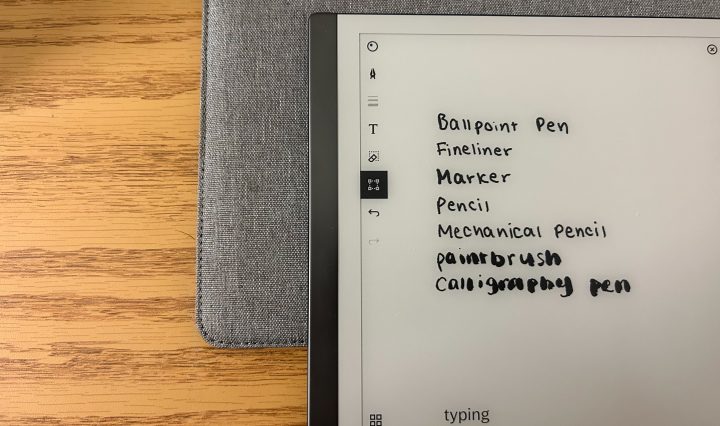
reMarkable 2 tablet with writing demonstrating each of the pen options.

reMarkable 2 Tablet Review & Comparison

June 15, 2023June 1, 2023 Allison Chong

As someone who recently converted to the iPad Air in my senior year of high school after swearing on notebooks for years, hearing about the reMarkable 2 tablet intrigued me. It seemed like the perfect blend of the two–combining the … Continue reading reMarkable 2 Tablet Review & Comparison

Academic Technology, High Performance Computing, Research

Democratizing Research through High-Performance Computing

June 12, 2023June 12, 2023 Jason Simms

In the early decades of modern computing – the 1960s and 1970s – only the largest corporations and governmental agencies had access to computers of any kind (think IBM, NASA, DoD, etc.). Computers were too large, too challenging to maintain, … Continue reading Democratizing Research through High-Performance Computing

Academic Technology, Panopto, Video
Screen cast of a person in a white shirt being recorded using Panopto Capture within a web browser.

Panopto Recording and Screen Casting Options

May 29, 2023May 29, 2023 Ashley Turner

Swarthmore users can now record videos with Panopto in two different ways: Panopto Capture: web browser based recording. No downloading required. Must have the most up to date version of Chrome or Firefox or Edge. Panopto Recorder: Panopto’s desktop application … Continue reading Panopto Recording and Screen Casting Options

Email, Calendaring, & Collaboration Tools, Faculty/Staff, Students, Tips

Keeping your digital content when you leave Swarthmore

May 25, 2023May 25, 2023 Doug Willen

Many students, caught up in the excitement of graduation, and faculty, rushing to complete grading and end-of-year work before they move on to other appointments, forget to take some necessary steps to secure their digital content stored on College servers, … Continue reading Keeping your digital content when you leave Swarthmore

Posts navigation

Older posts
Newer posts

Help Desk

x4357 (HELP)
Call 610-328-8513 (off campus)
support@swarthmore.edu
Beardsley 110

Classroom and Conferencing Technologies

x6201
avbox@swarthmore.edu
Beardsley 115

Academic Technology

acadtech@swarthmore.edu

Swarthmore College, 500 College Avenue, Swarthmore, PA 19081 Phone: Call 610-328-8000

© 2023 Swarthmore College. All Rights Reserved.

  • Twitter
  • Instagram
Proudly powered by WordPress Theme: Gazette by Automattic.